The Reality of Modern Threats

The Illusion of Basic Antivirus.

For many years, installing basic antivirus software was considered sufficient protection. This software operated reactively—comparing files on a computer against a known list of virus signatures.

Today, cyber threats are heavily automated and polymorphic, meaning they constantly change their code to avoid detection. By the time a new threat is added to a legacy antivirus database, the breach has already occurred. True network defense requires shifting from reactive scanning to proactive behavioral analysis.

Active Threat Hunting:

Our cybersecurity infrastructure operates under the assumption that threats will continuously attempt to breach the perimeter. We deploy systems that actively hunt for anomalies in network behavior, rather than waiting for a recognizable virus to execute.

Modern Cybersecurity Analysis
Behavioral Analytics

Endpoint Detection & Response (EDR).

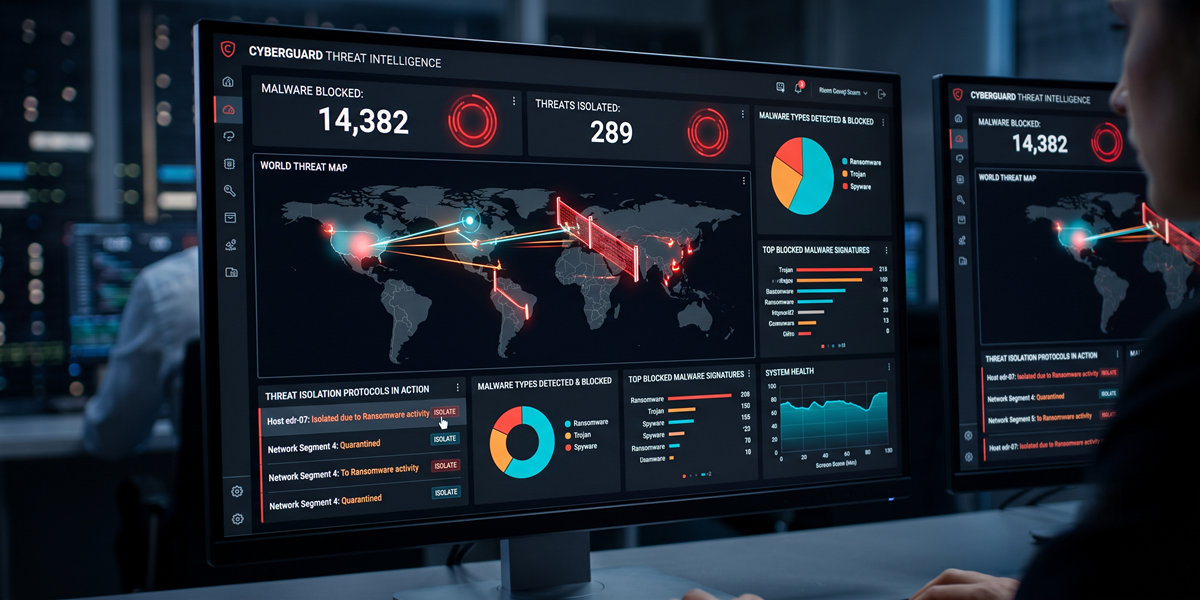
To counter sophisticated attacks like ransomware and zero-day exploits, we secure every computer and server (the endpoints) with AI-driven EDR technology.

  • Behavioral Monitoring: EDR does not rely on virus names. It monitors what a program is *doing*. If an unknown file suddenly attempts to alter system registries, disable backups, or rapidly encrypt documents, the EDR recognizes the malicious intent instantly.
  • Automated Isolation: Upon detecting anomalous behavior, the EDR automatically terminates the malicious process and physically isolates the infected machine from the rest of the network. This prevents lateral movement, ensuring a single compromised laptop cannot infect the main corporate server.
  • Forensic Visibility: Every action is logged. If an incident occurs, our security team can trace the exact origin of the threat, understanding precisely how it entered and what data it attempted to access.
EDR Threat Isolation Dashboard
Identity Verification

Zero Trust Architecture.

Historically, corporate networks operated like a castle with a moat. Once you were inside the building, you were trusted and had access to everything. In the era of remote work and cloud computing, this perimeter-based model is highly vulnerable.

We engineer networks based on Zero Trust principles: "Never trust, always verify."

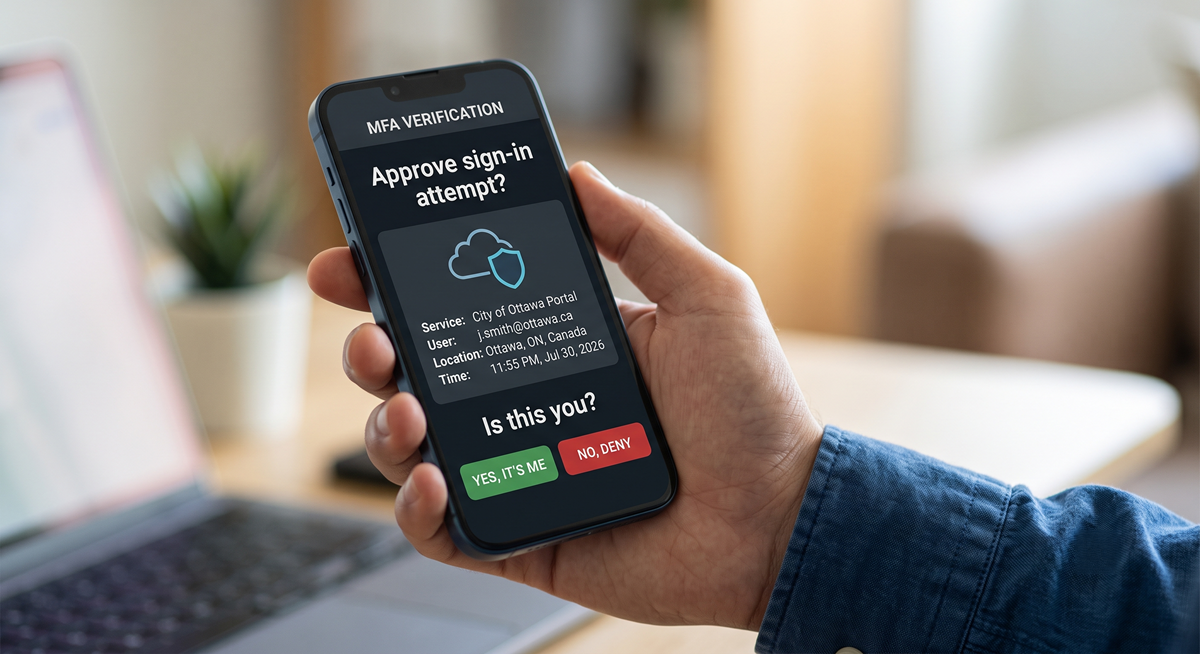
  • Multi-Factor Authentication (MFA): A compromised password is no longer sufficient to breach your environment. We enforce MFA across all critical applications, requiring secondary approval via a secure mobile prompt or physical security key.
  • Conditional Access: We establish strict rules governing how data can be accessed. For example, we can block all login attempts originating from outside of Canada, or prevent users from downloading sensitive company files onto personal, unmanaged home computers.
  • Principle of Least Privilege: Staff are granted access solely to the specific data and applications required for their role, minimizing potential exposure if an individual account is compromised.
Zero Trust Multi-Factor Authentication
Proactive Culture

Securing the Human Firewall.

The most sophisticated technical defenses can be bypassed if an employee is manipulated into handing over their credentials. Phishing attacks have evolved far beyond poorly written emails; they now convincingly mimic internal executives, trusted vendors, and critical software providers.

  • Phishing Simulations: We routinely deploy safe, simulated phishing emails to your staff. This safely identifies which employees are prone to clicking malicious links in a controlled environment.
  • Ongoing Education: Staff members who interact with a simulated threat are automatically enrolled in brief, engaging training modules to educate them on spotting subtle red flags, such as spoofed email domains and urgent requests for financial transfers.
  • Cultural Shift: Our goal is not to penalize staff, but to transform your workforce from a potential liability into an active line of defense, fostering a culture of healthy skepticism and security awareness.
Employee Security Awareness Training

Cybersecurity FAQs

Objective answers to complex digital security challenges.

This is a highly dangerous, outdated misconception. While Windows historically saw more viruses due to its larger market share in enterprise environments, macOS is increasingly targeted. Modern ransomware, phishing campaigns, and browser-based exploits affect Apple computers just as severely. EDR software is strictly required across both Windows and macOS devices in a commercial setting.

A Zero-Day vulnerability is a software flaw discovered by hackers before the software vendor (like Microsoft or Adobe) is aware of it. Because there are "zero days" of warning and no patch available yet, these exploits are highly dangerous. We mitigate this through rapid, automated patch management (closing the flaws as soon as patches are released) and relying on behavioral EDR rather than signature-based antivirus.

Cyber liability insurance providers have experienced massive losses from ransomware payouts over recent years. Consequently, they now require strict proof that businesses are maintaining robust security postures before issuing or renewing policies. They typically require mandatory enforcement of Multi-Factor Authentication (MFA), EDR deployment, and segregated backups. We assist clients in engineering their networks to meet these strict compliance requirements.

EDR (Endpoint Detection and Response) is the AI software installed on the computer to block threats. MDR (Managed Detection and Response) is the service layer—a team of human security analysts reviewing the alerts generated by the EDR. A SOC (Security Operations Center) is the physical facility or dedicated team providing 24/7/365 active threat hunting and incident remediation across the entire network.

Not inherently. A VPN (Virtual Private Network) simply creates an encrypted tunnel between a remote user and your office network, preventing people on public Wi-Fi from reading the data in transit. However, if that remote user's laptop is infected with malware, the VPN provides a secure, direct tunnel for that malware to enter your corporate server. This is why we transition clients from vulnerable VPNs toward Zero Trust Network Access (ZTNA).

No. Microsoft operates under a Shared Responsibility Model. They are responsible for the security *of* the cloud (keeping their physical data centers safe from hackers). You are responsible for security *in* the cloud. If an employee uses a weak password without MFA, or is tricked into granting a malicious third-party app access to their inbox, Microsoft will not intervene. Securing user identities and data access is strictly your operational responsibility.

Ensure Your Defenses are Operationally Sound.

Reach out to discuss a comprehensive vulnerability assessment and transition toward a zero-trust architecture.

Request a Security Audit